

Why the advertised price rarely tells the full story
Internet service agreements pack a lot of meaning into short phrases. A plan listed at a certain monthly price may carry equipment rental fees, introductory pricing windows, and automatic contract renewals that change what you pay and when. Reading past the headline number takes a few minutes but can prevent a large surprise on month 13 of a 12-month promotion.
The terms below appear in almost every residential internet agreement in the United States. Knowing what they mean before you sign puts you in a better position to compare plans on equal footing. If you are also evaluating what to review before switching providers, these definitions will help you work through that checklist more confidently.
| Standard promotional period | 12 to 24 months (Common across major U.S. residential ISPs) |
| Typical 4K stream bandwidth need | ~25 Mbps download (General industry guideline) |
| FCC broadband label requirement | Required for all ISPs selling to consumers (FCC rule effective 2024) |
| Equipment rental fee range | $10 to $20 per month (Typical U.S. provider range) |
| Common data cap threshold | 1 TB (1,000 GB) per month (Widely used by major cable providers) |
Speed terms you will see on every plan page
"Up to" speeds are the most common source of confusion. When a plan advertises "up to 500 Mbps," that number is the ceiling under ideal conditions, not a guaranteed minimum. Actual speeds depend on network congestion in your area, the type of connection (fiber, cable, DSL), the age of your wiring, and the devices you use. The Federal Communications Commission (FCC) has noted that advertised and actual speeds frequently differ, particularly during peak evening hours.
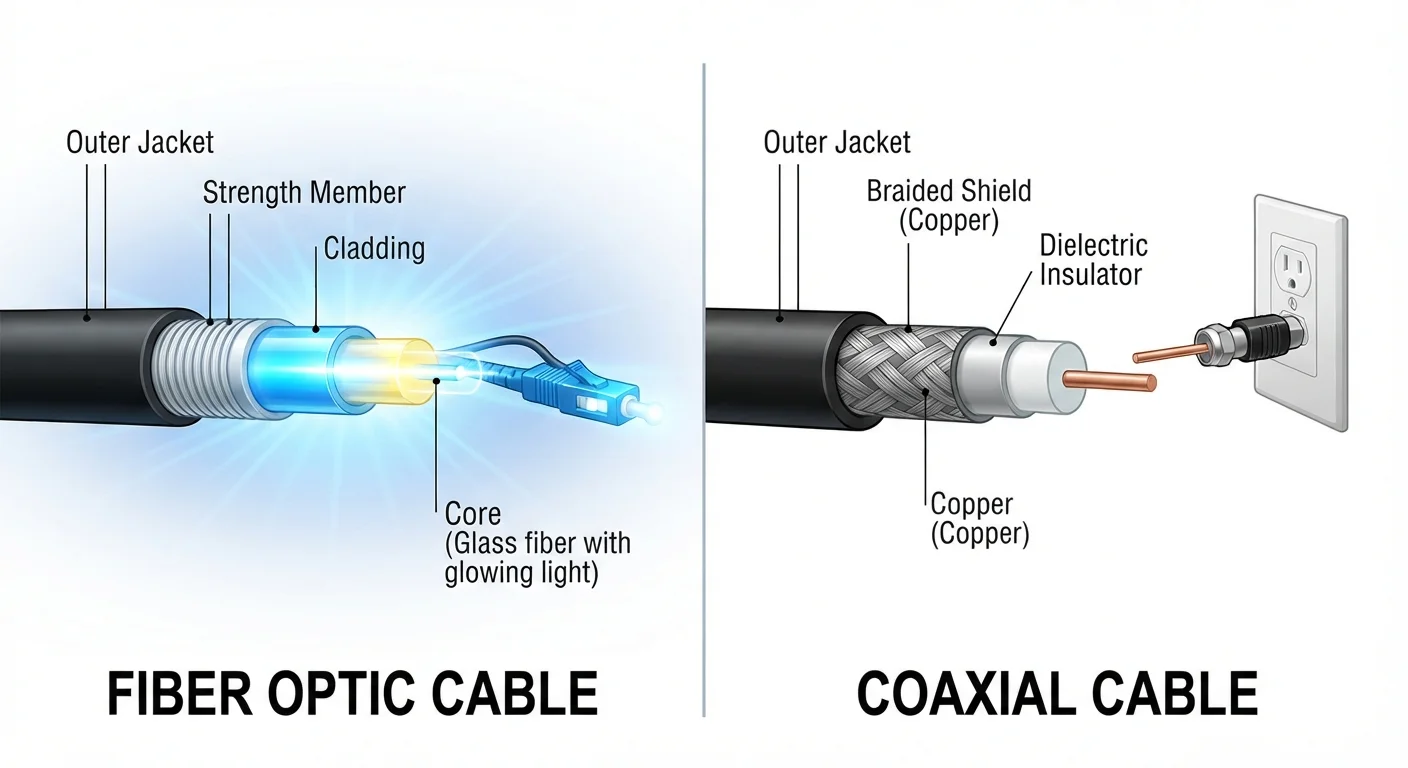
Download speed is how fast data moves from the internet to your device. Streaming video, loading web pages, and downloading files all draw on this. Upload speed is the reverse: data moving from your device outward. Video calls, sending large files, and smart-home devices that report data all rely on upload speed. Many cable plans offer much lower upload speeds than download speeds; fiber plans more often provide equal or near-equal speeds in both directions. See how fiber and cable connections compare for more on what that difference means day to day.
Mbps stands for megabits per second. A rough benchmark: a 4K video stream from most services typically needs around 25 Mbps of download capacity. A household with four people streaming, gaming, or video-calling at the same time needs considerably more. Latency (sometimes called ping) measures delay in milliseconds. Low latency matters most for video calls and online gaming; it has little effect on file downloads.
Mbps
Megabits per second. The standard unit for measuring internet speed. Higher numbers mean faster data transfer.
Latency
The time, measured in milliseconds, it takes for a signal to travel from your device to a server and back. Lower latency means less delay.
Data cap
A monthly limit on how much data you can use. Exceeding it may trigger extra charges or reduced speeds.
Throttling
A deliberate reduction in your internet speed, applied by the provider, often after you reach a data threshold or during high-traffic periods.
Early termination fee (ETF)
A penalty charge for canceling a contract before its agreed end date. The amount varies by provider and remaining contract length.
Promotional rate
A discounted price that applies only for an introductory period. After that period, the price rises to the standard rate.
Contract and billing terms worth reading carefully
Promotional pricing is a starting rate that expires after a set period, commonly 12 or 24 months. After that window, the price reverts to the standard rate, which providers list separately and which is often substantially higher. The standard rate is the price you should factor into any long-term budget comparison.
Early termination fees (ETFs) apply when you cancel a contract before its end date. ETFs are typically stated as a flat fee or as a per-month-remaining charge. Month-to-month plans usually carry no ETF but often have higher base prices.
Data caps (also called data thresholds or data allowances) set a monthly ceiling on how many gigabytes you can use. Exceeding the cap may result in overage charges, reduced speeds for the rest of the billing cycle (called throttling), or both. Not all plans have caps; those that do vary widely in the limit and the penalty. If your household streams video heavily, confirm whether a plan has a cap and what happens when you exceed it. This connects directly to what you actually receive from streaming service subscriptions, since video quality settings affect data consumption.
Equipment fees cover the modem and router the provider supplies. These are usually billed monthly as a rental. Some providers allow you to use your own compatible modem to avoid this fee; confirm compatibility before purchasing separate equipment. Installation fees are one-time charges for the technician visit required to activate new service. Providers sometimes waive them during promotions, but the waiver should be confirmed in writing before you agree to service.
A note on network management and throttling
Many providers include a network management policy in their terms of service. This language permits them to slow speeds for users who consume very high amounts of data during peak periods, even on plans marketed as "unlimited." The word unlimited in an internet plan typically means there is no hard data cap with overage charges; it does not guarantee consistent speeds at all times.
If you work from home or depend on a stable connection, look for the specific network management section in a provider's terms before signing. The FCC's broadband consumer labels, which providers are required to post, summarize data policies in a standardized format that makes comparison easier. You can also check why your in-home Wi-Fi signal varies, since some speed problems stem from your home network rather than the plan itself.
For a plain-language comparison of how similar terms appear in wireless agreements, cell phone plan terminology follows the same structure.