

Why signals fade before they reach every room
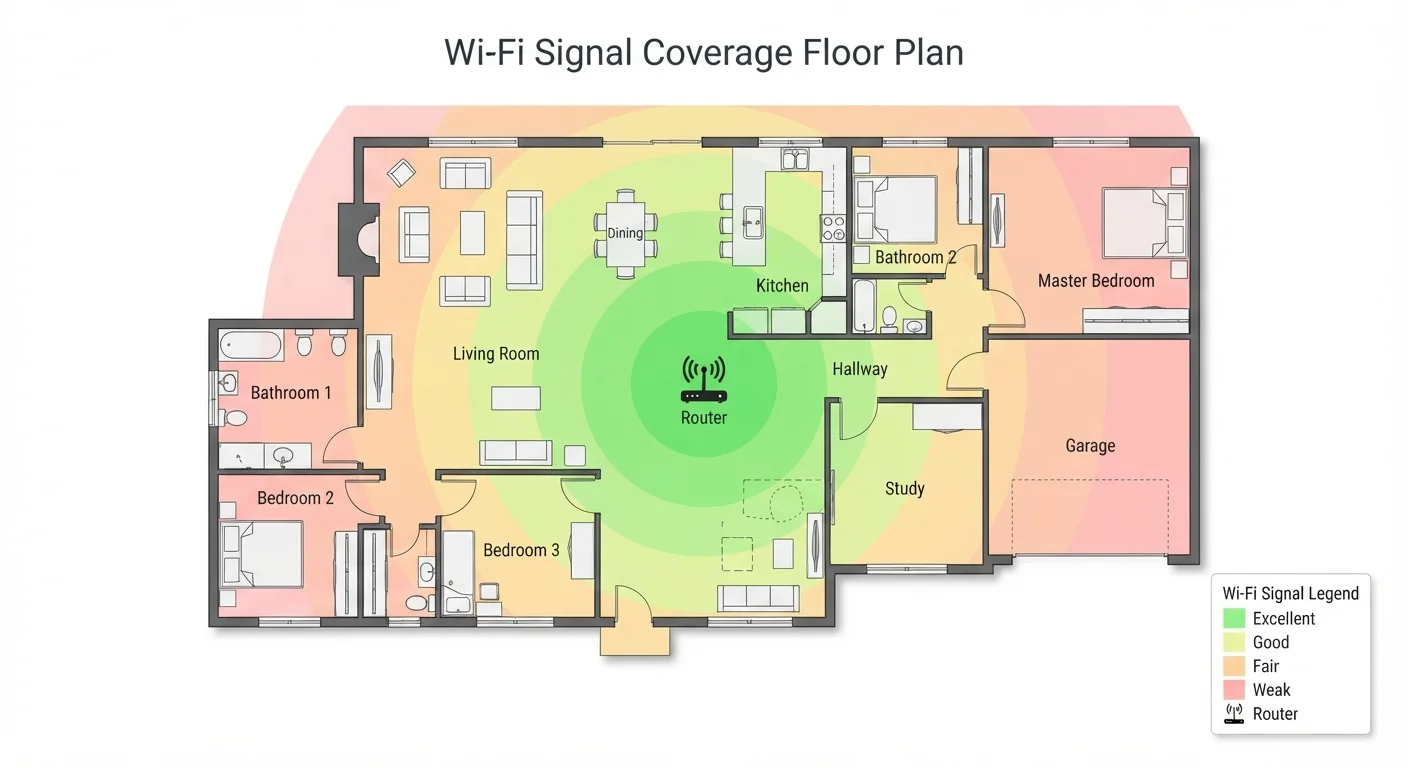
Your router sends a wireless signal in all directions, but that signal loses strength as it travels. Two factors drive most dead zones: distance and physical barriers.
Distance alone weakens any radio wave. A router in one corner of a large home may not reach the opposite corner with enough strength for reliable use. The problem gets worse when walls, floors, and ceilings stand between the router and your device.
Building materials vary a lot in how much signal they block. Drywall has little effect. Brick, concrete, and tile absorb radio waves significantly. Metal studs, foil-backed insulation, and large appliances like refrigerators can reflect signals and create unpredictable weak spots. Older homes with plaster-and-lath walls also tend to block signals more than modern drywall construction.
Frequency band matters too. The 5 GHz band carries data faster but has a shorter range and less ability to pass through walls than the 2.4 GHz band. If your router uses both bands, devices in distant rooms may stay connected longer on 2.4 GHz even though 5 GHz would be faster nearby.
Router placement and its effect on coverage
Where you put your router shapes coverage more than most people expect. A router tucked in a closet, placed on the floor, or pushed into one corner of the house sends much of its signal into walls, the ground, or empty space outside the home.
Central placement, at a mid-height on a shelf or mounted on a wall, gives signal the shortest average distance to travel to any room. For a two-story home, somewhere near the ceiling of the ground floor or the floor of the upper level can help both stories.
Start with placement before buying hardware
Before purchasing an extender or mesh system, try moving your router to a more central location. Run a speed test in the problem area before and after. Many dead zones shrink or disappear with a better router position, and the move costs nothing.
Some people keep routers near the point where the coax or phone line enters the house, which is often an exterior wall or basement. That location may be convenient for wiring but creates an uneven signal pattern. Running a longer ethernet cable to a more central spot often improves whole-home coverage without buying new equipment.
Interference from other devices
Other wireless devices in and around your home compete for the same radio frequencies. Cordless phones, microwave ovens, baby monitors, and neighboring Wi-Fi networks all generate radio signals that can disrupt yours.
In apartment buildings or dense neighborhoods, dozens of Wi-Fi networks may overlap. When many networks use the same channel within the 2.4 GHz band, they interfere with each other. Switching to a less crowded channel in your router's settings, or using the 5 GHz band where possible, can reduce that interference.
Bluetooth devices, smart home sensors, and streaming sticks also operate in overlapping frequency ranges. If you have a growing number of these devices, that can contribute to inconsistent performance in certain rooms. For a broader look at how smart home devices affect your network, see which smart home devices deliver real value.
Common approaches to filling dead zones
Once you identify where signal drops off, there are a few practical options.
- Repositioning your router is free and often produces a noticeable improvement before spending anything on new hardware.
- A Wi-Fi extender (also called a repeater or booster) connects to your existing network wirelessly and rebroadcasts the signal. Setup is straightforward, but the extended signal is weaker than the original, and some extenders create a separate network name that requires manual switching.
- A powerline adapter sends network data through your home's electrical wiring. You plug one unit into an outlet near your router and connect it via ethernet, then plug a second unit into an outlet in the dead zone room. Signal quality depends on the age and wiring layout of the home.
- A mesh Wi-Fi system uses multiple nodes that communicate with each other to spread one network across a larger area. Coverage is generally more consistent than a single router plus extender, though the hardware costs more upfront.
If you are unsure whether dead zones or your internet plan are the source of slow speeds, it helps to run a speed test while sitting next to your router. If speeds are fast there but slow elsewhere, the problem is coverage. If speeds are slow even next to the router, the issue may be with your plan or connection. Understanding what your internet plan terms mean can help you read that test result in context.